From website visitor to candidate
Chat widgets, forms and WhatsApp buttons that turn visitors into candidates. This is how you get more applications from your existing traffic. Straight into your inbox.

You attract visitors to your site. But what happens next?
Most visitors to a job vacancy page take no action. They read, hesitate and leave. Not because they aren’t interested, but because the barrier to entry is too high.
Visitors dropping off? That’s a thing of the past.
More candidates. Without increasing the budget.
Your careers site was already attracting visitors. The Conversion Toolbox ensures they no longer leave without leaving something behind.
Candidates decide when to attend an interview
Start a chat at 10.00 pm, fill in a form between shifts – it’s all possible. The widget is always ready and waiting; you don’t have to do a thing.
No barriers. Just conversations.
Long forms with mandatory fields put you off candidates. A chat widget or WhatsApp button asks for nothing, yet still provides all the information you need.
Put your (careers) website to work. These are the tools that’ll help you do just that.
|
Feature |
What it does |
Status |
|---|---|---|
|
Chat |
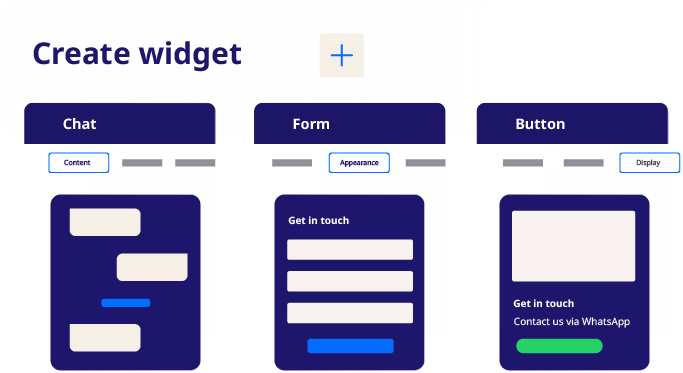
Start the conversation directly on your website. The conversation takes place online or via WhatsApp. The chat widget can be fully customised to match your own branding. (Requires Web Chat or WhatsApp to be active in the Inbox). |
|
|
Forms |
Collect job applications, event registrations, job alerts, call-back requests and much more. Completed forms are sent directly to MrWork. The Form Widget can be fully customised to match your own corporate identity. |
|
|
Buttons |
Sends candidates to a WhatsApp or Web Chat conversation with a single click. Requires WhatsApp or Web Chat to be active in the Inbox. The button widget can be fully customised to match your own corporate identity. |
|
|
Responsive view |
For each widget, you can configure how it should be displayed on desktop and mobile. You can set the display, position and behaviour for each device. |
|
|
Simple setup |
Place widgets quickly and easily across your entire (careers) website. |
|
|
Automatic follow-up |
Configure how new submissions are processed for each widget. You can automatically assign them, change their status and tags, and send a welcome message. |
|
Feature |
What it does |
Status |
|---|---|---|
|
Meta & LinkedIn Lead Ad Follow-up |
Leads from your adverts are automatically captured, with the option to follow up automatically. (Included as standard if you also use Campaigns: Jobs). |
|
|
Werkzoeken.nl |
Responses via Werkzoeken.nl are received automatically, after which they can be followed up automatically. |
|
|
Jobmatix |
Responses via Jobmatix are received automatically, after which they can be followed up automatically. |
Conversion Toolbox is even more powerful when used in combination.
Inbox
A single inbox for WhatsApp, text messages, email and web chat
Every conversation and every reply goes straight into the shared inbox.
AI Hub
Your AI recruitment colleagues are always on the job
Your AI colleague automatically follows up on new interviews and form responses.
Talent CRM
Manage, segment and activate your talent pool
New candidates are immediately assigned the correct status and tags.
Ready to get your (careers) website up and running?
In 30 minutes, we’ll show you how chat widgets, forms and WhatsApp buttons turn visitors into candidates. Straight to your inbox.