Automate your recruitment marketing
Reach your target audience with campaigns, whilst keeping a tight rein on your budget and results. From employer branding to recruitment campaigns, all on a single platform.

Campaigns everywhere. No overview.
Meta here, LinkedIn there, with the budget spread across separate platforms. You have to create content from scratch every time. You don’t know whether your employer branding campaign actually aligns with the vacancy going live tomorrow, and it’s completely unclear how much of the budget will be tied up along the way.
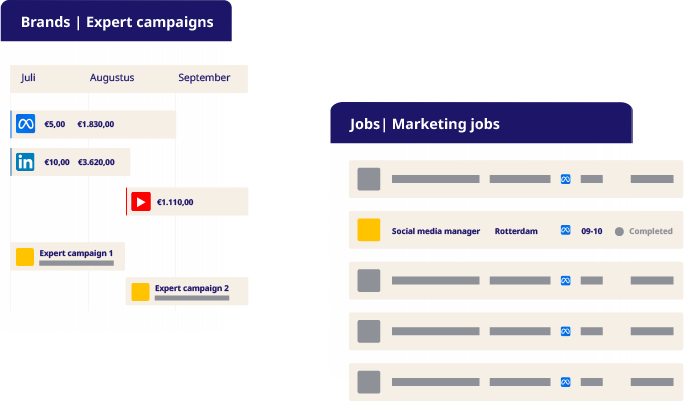
One place. Control over every euro and every candidate.
Your brand and your job vacancies work together, not in isolation from one another
Employer branding builds the target audience, whilst job marketing engages them. Both run via the same platform, using the same content library and the same data. There are no separate processes that merely happen to intersect.
Budget and results at a glance
Manage your media budget centrally, or buy it yourself from the networks using your own credit lines – the choice is yours. Real-time insight into what works, with benchmarks against your sector.
Less manual work, more guidance
Job vacancies are automatically fed in from your website or ATS. Campaigns start and stop automatically as soon as a vacancy expires. You set the strategy; the platform carries it out.
From strategy to results. Here’s what’s included.
|
Feature |
What it does |
Status |
|---|---|---|
|
Content library |
Manage all campaign content centrally. Use tags to link content to a specific campaign, target audience or job vacancy. |
|
|
Reporting & benchmarks |
Insights into campaign performance by channel, target audience or job vacancy. Compare your campaigns with MrWork industry benchmarks. |
|
|
Centralised management of media budgets |
A comprehensive overview of budgets and spend by channel, campaign and target audience. Choose whether MrWork buys media on your behalf or arrange it through your own networks. |
|
Feature |
What it does |
Status |
|---|---|---|
|
Job vacancy importer |
Automatically import job vacancies from your website or via an ATS connection. (An ATS connection is required for direct import from the ATS). |
|
|
Job groups (max. 10) |
Group job vacancies by recruiter, region, department or location. |
|
|
Meta & LinkedIn |
Set up campaigns manually or fully automatically, including campaign templates with pre-set budgets and structures, and automatic A/B testing. |
|
|
Additional job groups |
Expand if you need more than 10 job groups. |
|
Feature |
What it does |
Status |
|---|---|---|
|
Brand audiences (max 10) |
Define target audiences for targeted employer branding campaigns. Budgets and campaigns can be managed by target audience and stage in the funnel. |
|
|
Awareness & consideration |
Implement a full-funnel approach: separate campaigns for each stage. Set the target audience, content and budget for each stage individually. |
|
|
Meta & LinkedIn |
Setting up and running employer branding campaigns via Meta and LinkedIn. |
|
|
YouTube, TikTok, Snapchat, Reddit |
Expanding into additional channels for specific target audiences. |
|
|
Additional brand audiences |
Scale up when you need more than 10 brand audiences. |
|
Feature |
What it does |
Status |
|---|---|---|
|
Google Search |
Reach candidates at the very moment they are actively searching, using targeted search adverts. |
|
|
Google Display |
Visual adverts targeted at relevant websites and audiences. |
Campaigns is more effective when combined.
Inbox
A single inbox for WhatsApp, SMS, email and web chat
Leads from campaigns flow directly into the shared inbox.
AI Hub
Your AI recruitment colleagues are always on the job
An AI agent follows up on lead ads within seconds, 24/7.
Talent CRM
Manage, segment and engage your talent pool
Automatically retarget candidates who have previously shown interest.
Ready to automate your recruitment marketing?
In 30 minutes, we’ll show you how employer branding, recruitment campaigns and follow-up come together on a single platform.